 SWITCHING SIGNAL

Thinking about upgrading your gaming PC but not sure where to start? Whether you’re a teenager trying to squeeze more FPS out of Fortnite, a parent buying a first gaming PC, or someone who just wants games to stop lagging every five minutes — this guide will walk you through everything in plain English.
From graphics cards and RAM to cooling systems and bottlenecks, we’ll explain exactly what matters, what doesn’t, and how to get the best gaming performance for your money.
What You’ll Learn From This Gaming PC Upgrade Guide
By the end of this gaming PC upgrade guide, you’ll understand exactly which upgrades actually improve gaming performance — and which ones are mostly marketing hype.
We’ll explain the difference between GPUs, CPUs, RAM, SSDs and cooling systems in simple terms, making it easier for beginners, teenagers and parents to confidently choose the best PC upgrades for gaming without overspending.
You’ll also learn:
- how to identify what’s slowing down your current gaming PC,
- whether AMD or NVIDIA is better for your setup,
- the real difference between DDR4 and DDR5 RAM,
- why SSD and M.2 upgrades matter so much,
- how cooling affects gaming performance,
- and what a gaming PC bottleneck actually means.
Most importantly, this guide will help you build a smarter gaming PC upgrade path for you, whether you’re upgrading an older setup or buying your very first gaming rig.
Why Upgrade Your Gaming PC Instead of Buying a New One?
One of the biggest myths in PC gaming is that you need to replace your entire setup every few years. In reality, most gaming PCs can be massively improved with just one or two smart upgrades.
Maybe your games are stuttering. Maybe new releases are struggling to hit decent FPS. Or maybe your PC sounds like it’s preparing for takeoff every time you open Call of Duty.
The good news? You usually don’t need a completely new machine.
A proper gaming PC upgrade can:
- improve FPS,
- reduce loading times,
- make your system quieter,
- improve graphics quality,
- future-proof your setup,
- and make your whole PC feel faster.
For most gamers, upgrading specific parts is far cheaper than starting from scratch.

What Should You Change First in a Gaming PC Upgrade?
This is the most common question people ask — and honestly, there’s no universal answer.
The “best” gaming PC upgrade depends on what your current PC is struggling with.
If your games look blurry or run at low FPS, your graphics card is probably the issue. If your PC takes longer to boot than a microwave meal, your storage drive could be the problem. If everything freezes while multitasking, you may need more RAM.
That said, for most gamers, the graphics card (GPU) is usually the biggest performance upgrade.
Think of the GPU as the engine responsible for drawing everything you see in-game — explosions, textures, shadows, lighting, all of it.
If you upgrade nothing else, upgrading your GPU will usually give the biggest boost in gaming performance.
GPU Upgrades Explained — AMD or NVIDIA?
If you’ve spent even five minutes researching gaming PCs online, you’ve probably seen endless arguments about AMD vs NVIDIA.
It’s basically the PlayStation vs Xbox debate of the PC world.
The truth? Both make excellent graphics cards.
NVIDIA cards are known for their powerful ray tracing technology, DLSS upscaling, and strong streaming performance. Ray tracing is basically fancy lighting effects that make games look more realistic. DLSS is smart AI technology that boosts FPS without making games look worse.
AMD graphics cards are usually better value for money. You often get more raw gaming performance and more VRAM (video memory) for the same price.
For teenagers playing esports titles like Fortnite, Valorant, Minecraft or Rocket League, AMD cards are fantastic value. For players wanting ultra graphics settings, ray tracing, or content creation features, NVIDIA is often the stronger option.
A GPU upgrade is usually the best PC upgrade for gaming because it directly affects:
- FPS,
- graphics quality,
- game smoothness,
- and monitor performance.
Go learn more about Nvidia DLSS here.
Go learn more AMD Radeon Graphics here.

What Is VRAM and Why Does Everyone Suddenly Care About It?
VRAM stands for Video Random Access Memory.
Sounds complicated, but it’s actually simple.
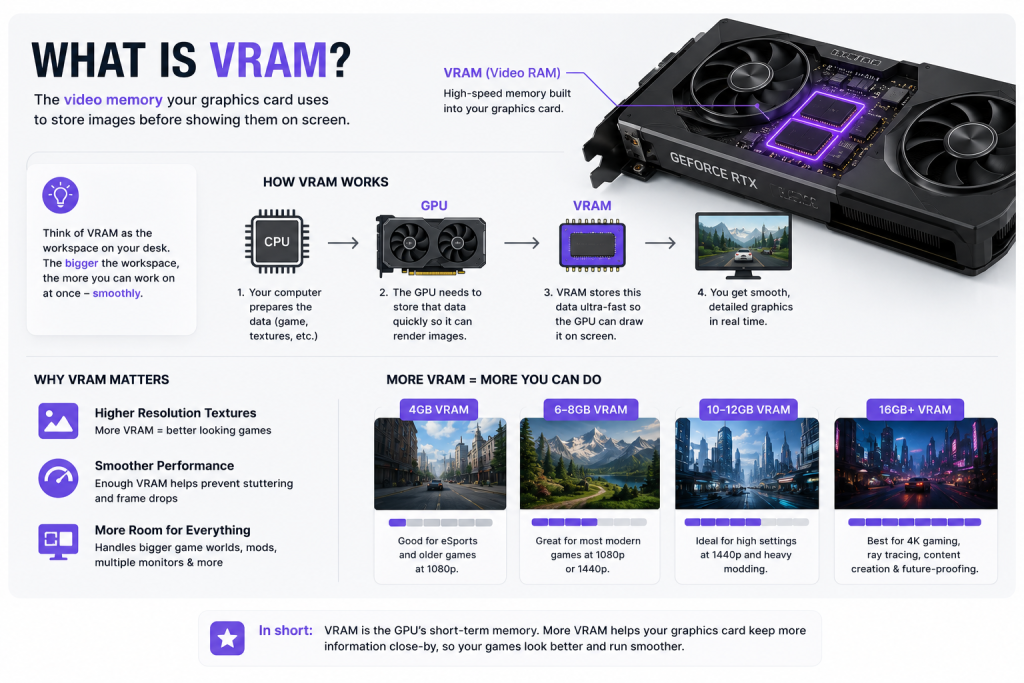
VRAM is memory specifically used by your graphics card. Games use it to store textures, lighting information, and graphical data.
Modern games are getting huge. Some AAA titles now use over 12GB of VRAM at high settings.
If your GPU runs out of VRAM, games can stutter badly, textures load slowly, and performance drops.
That’s why gamers are paying more attention to VRAM in 2026 than ever before.
For 1080p gaming, 8GB is still okay.
For 1440p gaming, 12GB is becoming the sweet spot.
For 4K gaming, more VRAM is usually better.
RAM Upgrades — DDR4 vs DDR5 Explained Simply
RAM is one of the most misunderstood parts of a gaming PC upgrade.
People often think “more RAM = more FPS.”
Not exactly.
RAM mainly helps your system multitask smoothly. It allows your PC to quickly access information while gaming, streaming, browsing, or chatting on Discord.
If you don’t have enough RAM, your PC starts slowing down dramatically.
Right now, most gamers should aim for:
- 16GB minimum,
- 32GB ideal.
DDR4 and DDR5 are simply different generations of RAM.
DDR5 is newer, faster, and more future-proof. DDR4 is older but still perfectly fine for gaming.
If you already own a DDR4 gaming PC, upgrading to DDR5 usually isn’t worth replacing your whole motherboard unless you’re building a new system anyway.
For first-time gaming PC buyers, DDR5 makes sense because it gives better long-term upgrade potential.

H2: How Much RAM Do You Actually Need for Gaming?
This is easily one of the biggest areas where people overspend when following a gaming PC upgrade guide.
A lot of gaming PC companies, influencers and flashy YouTube builds make beginners think they need ridiculous amounts of RAM just to play modern games smoothly. You’ll regularly see systems advertised with 64GB or even 128GB of RAM as if it’s essential for gaming performance.
For the vast majority of gamers, it simply isn’t.
In reality:
- 16GB is still perfectly usable for most games,
- 32GB is the ideal sweet spot for modern gaming,
- and 64GB+ is mainly designed for professional workloads like 4K video editing, 3D rendering, virtual machines or workstation tasks.
If you’re mainly playing Fortnite, Minecraft, Roblox, GTA, Call of Duty, FIFA or other popular online games, 32GB is already more than enough for an excellent gaming experience.
This is especially important for parents buying a first gaming PC for teenagers, because RAM is one of the easiest ways companies artificially inflate the price of gaming PCs without delivering meaningful gaming performance improvements.
More RAM does not automatically mean more FPS.
Once your system already has enough RAM available, adding even more often results in little to no noticeable improvement in games. This is why a balanced gaming PC upgrade guide should always focus on real-world gaming performance rather than flashy specs that look impressive on marketing pages.
The same thing applies to RAM speed.
Modern DDR5 RAM is incredibly fast, but many gamers are now spending huge amounts of money chasing ultra-high clock speeds that simply aren’t necessary for gaming. Right now, DDR5 RAM around 5600MHz–6000MHz is widely considered the sweet spot for gaming PCs in terms of performance, stability and value.
Anything beyond 6000MHz often starts entering diminishing returns territory.
That basically means you spend a lot more money for very small FPS improvements that most players would never even notice during gameplay. Some high-end DDR5 kits running at 7200MHz, 7600MHz or higher can cost dramatically more than standard gaming RAM, despite offering only tiny real-world differences in performance.
In many situations, that extra money would be far better spent on:
- a stronger GPU upgrade,
- a larger NVMe SSD,
- better cooling,
- or a higher-quality PSU.
Those upgrades usually have a much bigger impact on gaming performance than ultra-fast RAM ever will.
RAM prices are also still relatively high at the moment, especially for premium DDR5 kits with aggressive RGB lighting, flashy heatsinks and extreme factory overclocks. While these kits can look amazing inside a modern gaming PC build, they’re not always the smartest purchase if you’re trying to maximise value for money.
Another common mistake when people upgrade a gaming PC is mixing incompatible RAM kits together. Even if two kits look similar, combining different RAM speeds, brands or timings can sometimes cause instability, crashes or reduced performance. If possible, it’s always best to use a matched RAM kit designed to work together properly.
A good gaming PC upgrade guide should always prioritise balanced upgrades over unnecessary overspending.
For most gamers in 2026, 32GB of quality DDR5 RAM running around 6000MHz gives the best balance of gaming performance, future-proofing and value without wasting money on unnecessary specs that provide minimal real-world benefits.
SSD vs M.2 — What’s the Difference?
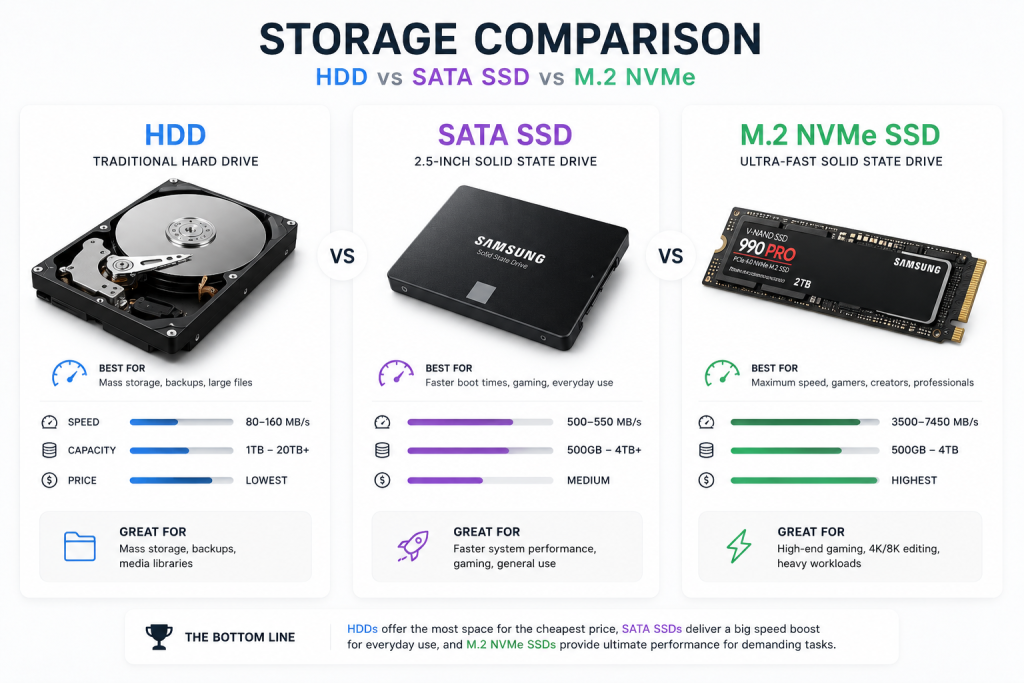
If your current PC still uses an old hard drive (HDD), upgrading to an SSD will make your computer feel completely different.
Seriously.
Games load faster. Windows starts faster. Everything becomes smoother.
A traditional hard drive stores data on spinning discs — like old-school technology from another era.
An SSD (Solid State Drive) has no moving parts, making it dramatically faster.
Then we have M.2 NVMe drives.
These are basically SSDs on steroids.
They plug directly into the motherboard and offer incredibly fast read/write speeds.
For gaming, this means:
- faster loading screens,
- quicker Windows boot times,
- smoother texture streaming,
- less waiting around.
Some open-world games now actually recommend SSDs because traditional hard drives struggle to load assets quickly enough.
Will an SSD Increase FPS?
This is one of the biggest misconceptions in PC gaming.
An SSD usually won’t massively increase FPS directly.
What it will do is improve:
- loading times,
- texture streaming,
- game responsiveness,
- Windows speed,
- overall smoothness.
Games simply feel better on SSDs.
And honestly, once you switch to an NVMe drive, going back to an HDD feels painful.
Gaming PC Cooling — Air Cooling vs Water Cooling
Cooling is where gaming PCs start looking properly futuristic.
You’ve probably seen those insane RGB liquid-cooled PCs online that look like alien technology.
But do you actually need water cooling?
Not always.
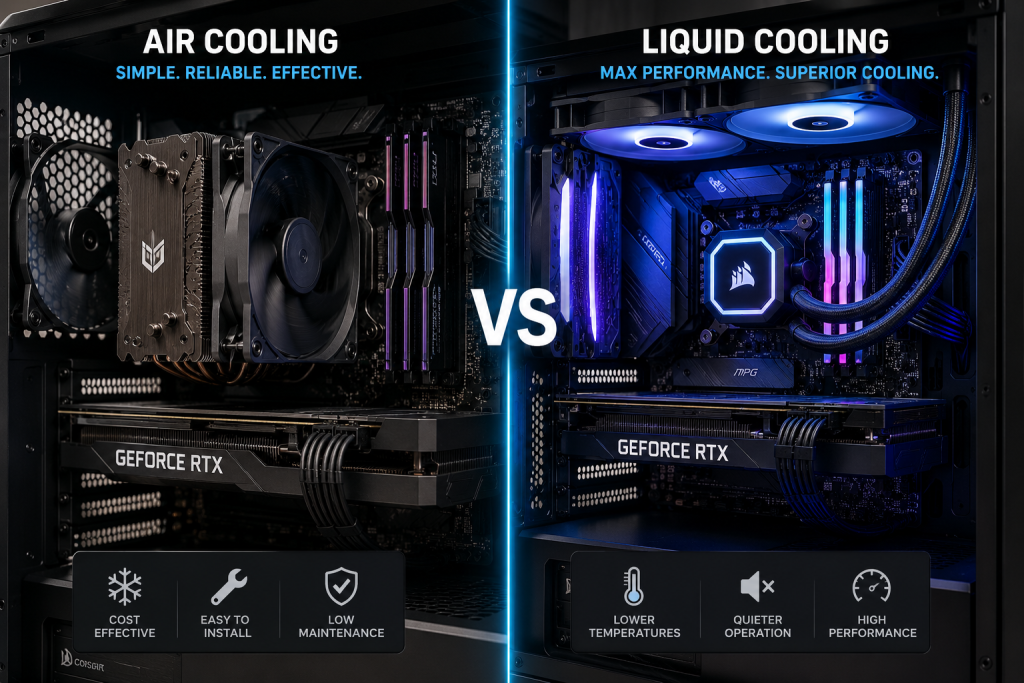
Air coolers are still excellent in 2026. In fact, many high-end air coolers compete with liquid cooling performance.
Air cooling is:
- cheaper,
- reliable,
- easier to maintain,
- and usually quieter than cheap liquid coolers.
Water cooling (usually called AIO cooling) uses liquid to transfer heat away from the CPU.
It’s great for:
- powerful CPUs,
- overclocking,
- quieter high-performance systems,
- premium aesthetics.
If you’re building your first gaming PC, a quality air cooler is often the smartest choice.
Why Is My Gaming PC So Loud?
If your PC sounds like a jet engine, it’s usually caused by:
- overheating,
- poor airflow,
- cheap fans,
- dust buildup,
- or old thermal paste.
A clean, well-cooled gaming PC should be relatively quiet, even during gaming.
This is why airflow matters so much.
Good airflow means cool air enters the case while hot air exits efficiently.
Bad airflow basically traps heat inside your PC like an oven.
PSU Explained — What Power Supply Do You Need?
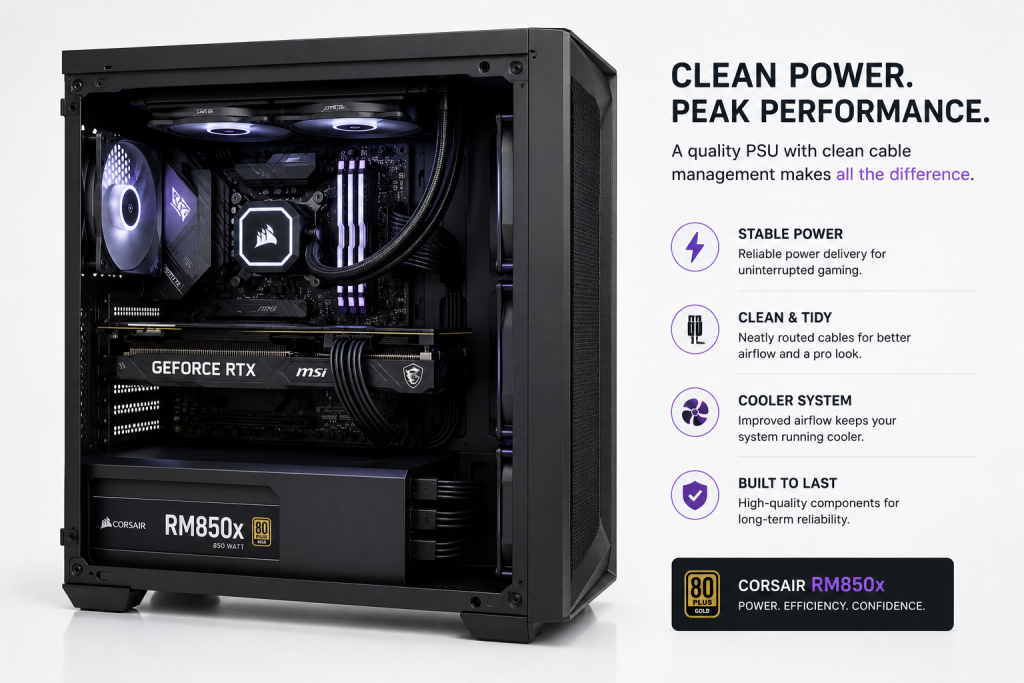
The PSU (Power Supply Unit) is one of the least exciting parts of a gaming PC upgrade.
It’s also one of the most important.
Your PSU powers every single component in your system.
Cheap power supplies can cause:
- crashes,
- instability,
- random shutdowns,
- and even hardware damage.
A good PSU protects your investment.
Most gaming PCs in 2026 should ideally use:
- 650W minimum for mid-range systems,
- 750W+ for high-end GPUs,
- 850W+ for enthusiast builds.
You’ll also see ratings like:
- Bronze,
- Gold,
- Platinum.
These refer to power efficiency.
80+ Gold is usually the sweet spot for gaming PCs.
What Is a Bottleneck in a Gaming PC?
“Bottleneck” is one of the scariest words beginners hear in PC gaming.
In reality, it’s not that complicated.
A bottleneck simply means one component is holding another back.
Imagine putting a tiny engine inside a Ferrari.
That’s basically what happens when a weak CPU is paired with an ultra-powerful GPU.
For example:
- an old Ryzen 5 paired with an RTX 5080,
- or a weak CPU with a high-end graphics card.
The GPU can’t reach full performance because the CPU can’t keep up.
The opposite can happen too.
If you pair an incredibly powerful CPU with an older GPU, the graphics card becomes the bottleneck.
Some bottlenecking is completely normal. Every PC has one somewhere.
The goal is balance.

Signs Your Gaming PC Has a Bottleneck
A gaming PC bottleneck can cause:
- stuttering,
- inconsistent FPS,
- low GPU usage,
- frame drops,
- poor performance in CPU-heavy games.
If your CPU is constantly sitting at 100% usage while gaming, there’s a good chance it’s limiting performance.
This is why balanced gaming PC upgrades matter.
Upgrading randomly without checking compatibility can waste money.
Should You Upgrade Your CPU or GPU First?
For most gamers:
- GPU first,
- CPU second.
A graphics card upgrade almost always improves gaming performance more dramatically.
However, if your processor is very old, your CPU may be limiting your graphics card.
That’s why bottleneck calculators are useful.
They help identify whether your current setup is balanced. If your unsure wether your GPU is bottlenecking the go check out our Bottleneck Calculator.

How Often Should You Consider a Gaming PC Upgrade?
A well-built gaming PC can easily last 5–7 years with sensible upgrades.
Most gamers upgrade:
- GPU every 3–5 years,
- storage when needed,
- RAM occasionally,
- CPU less frequently.
The beauty of PC gaming is flexibility.
You don’t need to replace everything at once.
Common Gaming PC Upgrade Mistakes to Avoid
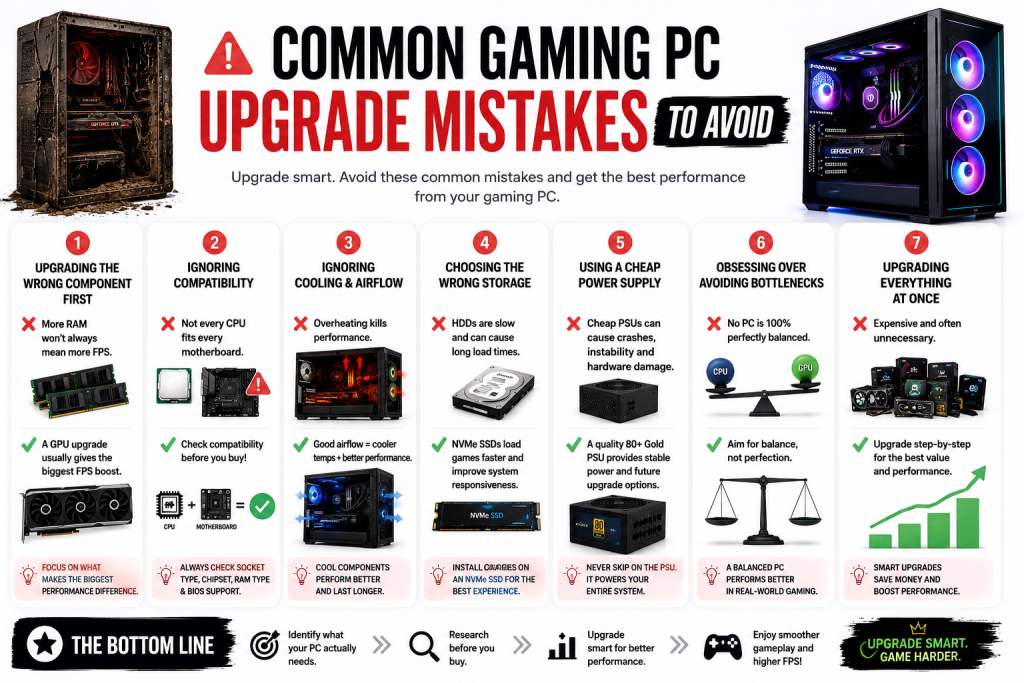
One of the biggest mistakes people make when following a gaming PC upgrade guide is upgrading the wrong component first.
A lot of beginners immediately buy more RAM because they’ve heard “more RAM means more FPS,” but in many cases, the real issue is actually an outdated graphics card. For most gamers, a GPU upgrade will improve gaming performance far more than adding unnecessary amounts of memory.
Another common mistake when people upgrade a gaming PC is ignoring compatibility. Not every CPU works with every motherboard, and not every power supply can safely handle newer graphics cards. This is why researching gaming PC upgrades properly is so important before spending money.
Cooling is another area where many first-time builders struggle. Some gamers spend huge amounts on expensive hardware but completely ignore airflow. Even the best PC upgrades for gaming can perform badly if your system is overheating. Good airflow, clean cable management and proper cooling can make a massive difference to gaming performance and system lifespan.
Storage mistakes are incredibly common too. In 2026, installing modern games on an old hard drive can seriously slow down loading times and texture streaming. Upgrading to an NVMe SSD is one of the smartest gaming PC upgrades for beginners because it improves the overall responsiveness of the entire system.
Power supplies are probably the most overlooked component in any gaming PC upgrade guide. Cheap PSUs can cause crashes, instability and upgrade limitations later on. A reliable 80+ Gold PSU gives your gaming PC stable power delivery and future upgrade flexibility.
Finally, many gamers become obsessed with avoiding bottlenecks entirely. The truth is every gaming PC has some form of bottleneck — the goal is balance, not perfection. A balanced gaming PC upgrade path will always perform better than randomly buying the most expensive parts available.
The best approach is upgrading your gaming PC step-by-step, focusing on the components that will actually improve your gaming experience the most.
Final Thoughts — The Best Gaming PC Upgrade for Most People
Upgrading your gaming PC shouldn’t feel confusing or intimidating.
Most performance issues can be solved with a few smart upgrades rather than buying a completely new machine.
For the majority of gamers, the best Gaming PC upgrade order is:
- graphics card,
- SSD/NVMe storage,
- RAM,
- CPU,
- cooling,
- PSU.
Whether you’re a teenager building your first gaming setup or a parent trying to understand what half these weird PC terms mean, the key thing to remember is this:
You do not need the most expensive parts to enjoy gaming.
Balanced upgrades matter far more than flashy marketing.
And if you’re unsure where to start, Glitchtechgaming.co.uk specialises in gaming PC upgrades, custom builds, modifications, and beginner-friendly advice to help gamers get the best performance possible without wasting money.
If you want help applying this guide to a PC or upgrade, talk directly with the Glitchtech builders.
Talk to a builder